Why most people track peptides wrong
Most people running a peptide protocol are doing one of three things: a notes app, a spreadsheet, or nothing at all. All three have the same problem — they were never built for this.
A notes app doesn't know your reconstitution math. A spreadsheet doesn't remind you to rotate injection sites. And nothing at all means you're running expensive compounds without any record of what you're doing, when you did it, or whether it's working.
Peptide protocols are not simple. BPC-157 at 250mcg twice daily with TB-500 at 750mcg twice weekly, alongside a GHK-Cu supplement and a daily water habit — that's four different items, three different schedules, two different injection routes, and one set of reconstitution calculations that you need to get right every time. You need a system built for this.
Start with your dashboard
The first thing you see when you open Protocol is your Today screen — a real-time view of everything happening in your protocol. Today's doses, what's coming up, what's been completed, your streak, and your Active Levels chart showing estimated blood concentration for every compound simultaneously.
That Active Levels chart is something no other peptide app has. When you're running BPC-157 at a different frequency than TB-500, seeing both compounds' estimated concentration curves on the same timeline helps you understand how they interact — not just whether you took your dose today.
Your protocols are listed below — each with a status (Active, Completed, Paused), the number of items, and a tap to open the full detail. You can run multiple protocols simultaneously.

Active Levels shows every compound's estimated concentration in real time.
Adding compounds to your protocol
Every compound you add to a protocol starts with a search. Type the name — BPC-157, TB-500, Semaglutide, Semax — and Protocol finds it in the 81-compound catalog. Selecting from the catalog means it already knows the compound's pharmacokinetic profile, which drives the Active Levels chart and your dosing schedule.
Then you enter your specific inventory details — how much is in the vial, how many vials you have, the purchase price (for cost tracking), storage location, vendor, and batch number. Protocol calculates your reconstitution math automatically: how much BAC water to add, what concentration you'll get, how many units to draw for each dose.
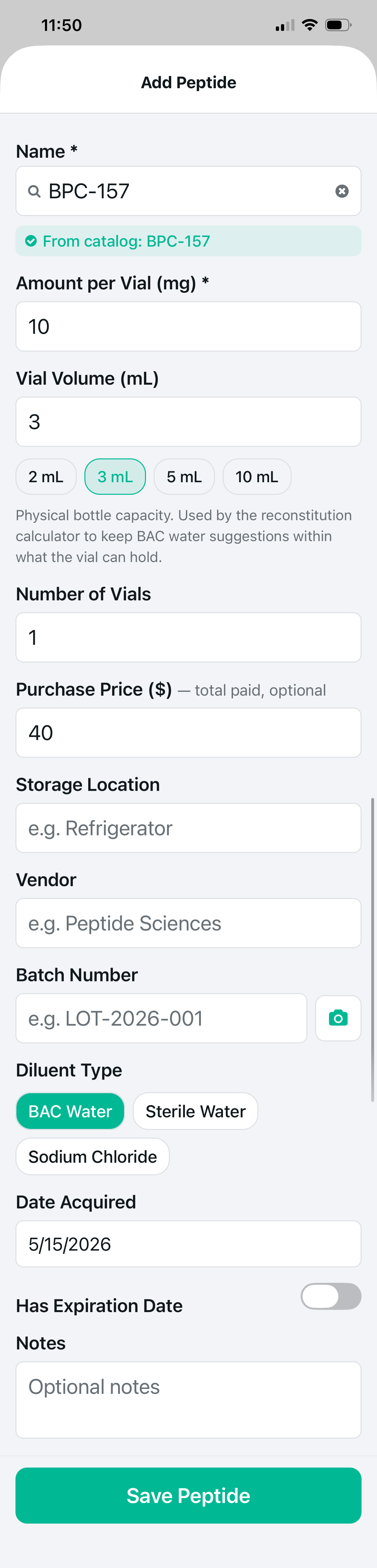
Catalog match auto-fills PK data.

Stack Score and Interaction Checker at a glance.
The catalog match (shown as "From catalog: BPC-157" in teal) is important. It means Protocol knows this compound's half-life, peak time, and dosing characteristics — the data that powers your Active Levels chart. If you add a compound not in the catalog, you can still track it, but it won't appear on the PK curve.
Every field matters: vial size drives reconstitution math, purchase price feeds cost tracking, batch number connects to your inventory record. Fill it once, Protocol handles the rest.
What a built protocol looks like
Once you've added your compounds, your protocol detail screen shows everything in one place: each compound with its dose, schedule, and route; the Interactions panel automatically checking how your compounds work together; and the Stack Score — an AI-generated rating of your overall protocol quality across six dimensions.
The example is a Cognitive Enhancement Stack — Semax and Selank, two Russian-developed intranasal peptides used together for focus and anxiolytic effect. Protocol confirms they are synergistic and scores the overall stack at 7.8/10 — Advanced. The radar chart breaks that down across Synergy, Redundancy, Side Effects, Practicality, Goal Alignment, and Evidence.
Notice that peptides, supplements, and habits all live inside the same protocol. Your water intake, your sleep habit, your supplement stack — they belong in the same tracking system as your peptides, because they affect the same outcomes. Protocol-only capability.
Stack Score 7.8/10. Semax + Selank confirmed synergistic.
Logging a dose — the right way

Tap your exact site on the 3D map. Rotation history in color.
Every dose log in Protocol captures three things: the compound and amount, the route of administration, and the injection site. The third one is what most people skip — and it's the most important for long-term protocol health.
Injection site rotation prevents scar tissue buildup, lipodystrophy, and absorption inconsistencies. Protocol's 3D body map shows front and back simultaneously — tap anywhere to log your exact injection site. Color-coded dots show your history: green for rested, orange for recent, red for today, blue for never used.
The dose amount is calculated automatically from your reconstitution. If you reconstituted 10mg of BPC-157 in 3mL of BAC water, Protocol knows you're at 3.33mg/mL — and when you set a dose of 250mcg, it tells you to draw 15 units on an insulin syringe. No math. No guessing.
Beyond doses — what else to track
A peptide protocol is not just about the peptides. What you eat, how you sleep, how you hydrate, what supplements you stack alongside — all of it affects outcomes. Protocol is the only tracker that puts all of this in one place.
Research every compound before you run it
Every compound in Protocol's catalog links directly to its full research profile. Tap "View Full Profile" on any catalog compound and you get the mechanism of action, evidence grades, published research citations, pharmacokinetic data, dosing tables, reconstitution guides, and FAQ.
81 compound profiles. No paywall on the research. Because if you're going to put something in your body, you should understand what it does.
Start tracking your protocol today
Protocol is free to download. Every new install gets 14 days of Pro automatically — no opt-in, no credit card.

iOS & Android · Free to start